Arca AI · Private document intelligence on your own servers
Your documents. Your server. Answers you can verify.
Arca helps legal, audit and analyst teams work with large volumes of confidential documents: search them, ask questions and get answers with a citation for every statement, compare many documents in a review grid, and receive answers in your firm’s house style.
Local
All processing, including the AI, runs on your servers. Nothing goes to a cloud service.
Grounded
Answers come only from your documents. If the answer is not there, Arca says so.
Permission-aware
Users see and get answers only from workspaces they are cleared for.
Audited
Sign-ins, questions, views and exports go to a tamper-evident audit log.
Screens
Inside Arca AI
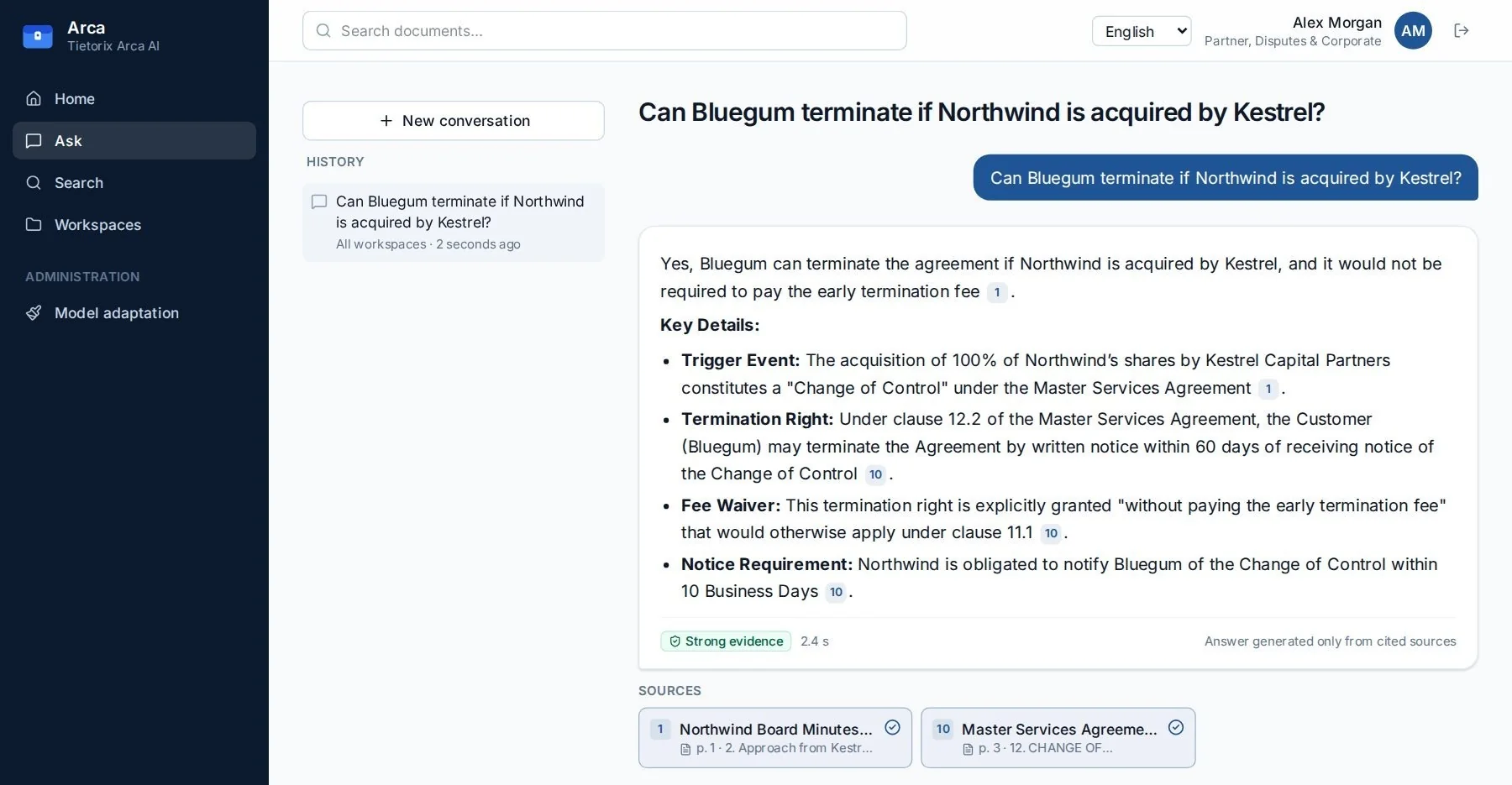
From a data room to a cited answer: review grids, the source passage in the original document, and answers rewritten in your house style.

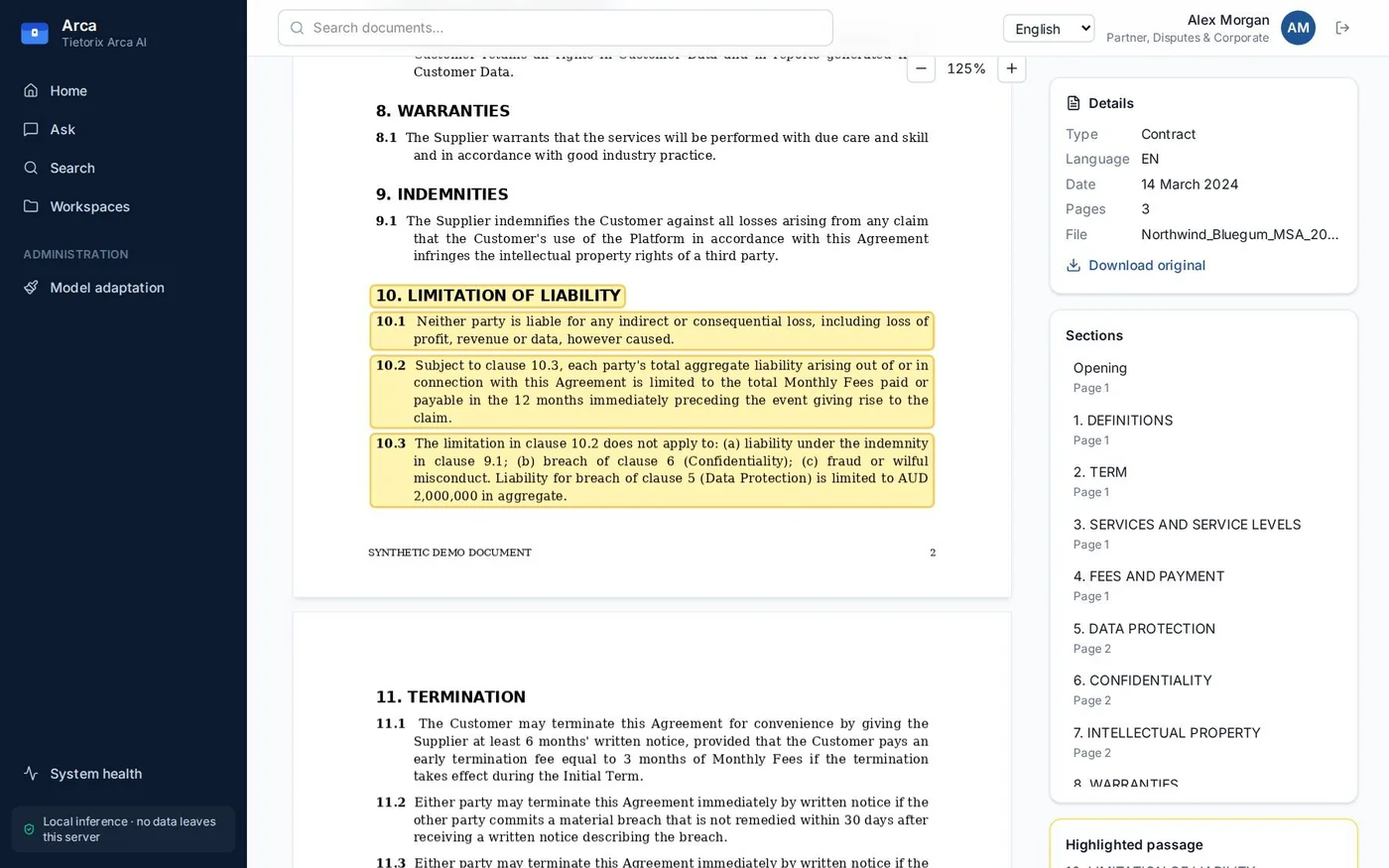
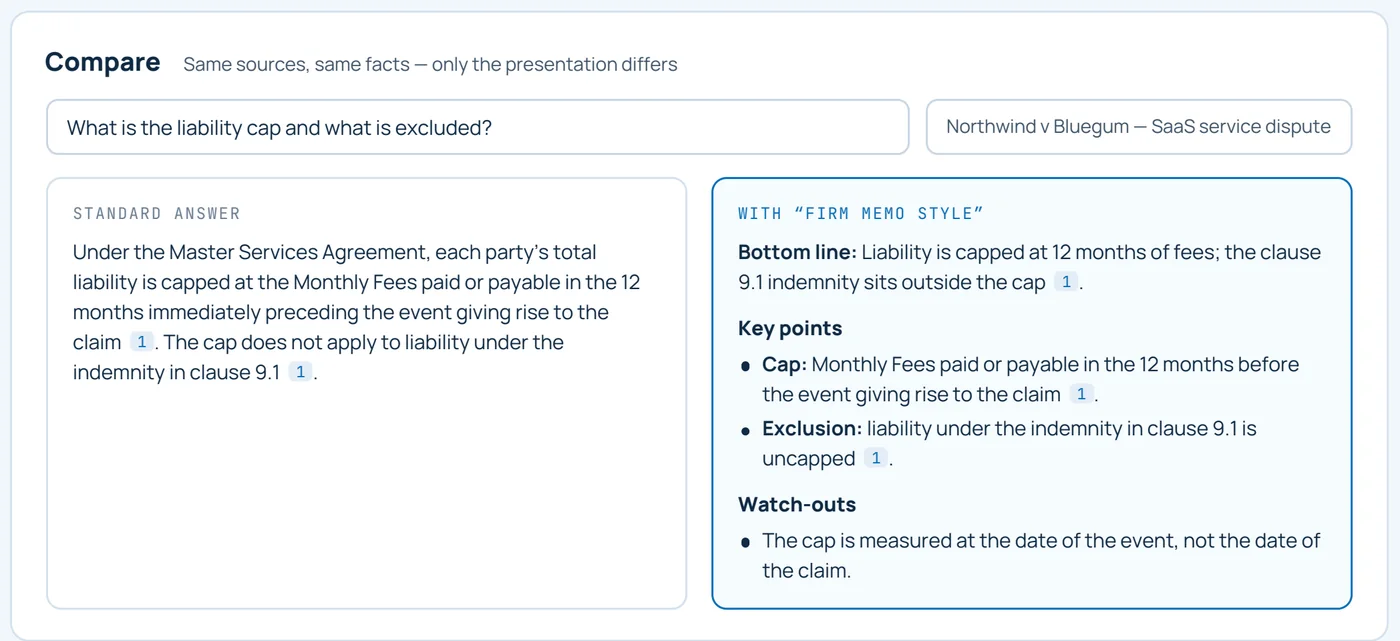
Screenshots from a demo installation. Companies and documents are fictional.
01 — Capabilities
From a data room to a cited answer
Workspaces keep each matter separate; everything inside them is searchable, citable and audited.
Workspaces
One per matter, engagement, claim, case or project, with members, roles and a classification level.
Document ingestion
PDF, Word, e-mail, HTML, text and CSV. Clauses, headings, language, type and date are recognised; files are encrypted at rest.
Hybrid search
Keyword search with word forms plus meaning-based search that works across languages.
Questions with citations
Answers stream in seconds. Every statement links to the exact passage, highlighted in the original.
Evidence rating
Each answer is checked: citations present, figures and dates found in the source, quotes verbatim.
Review grids
The same questions across many documents, every cell cited, reviewed and exported to Excel.
House style
Answers rewritten in your firm’s format by an adapter trained on your server, facts unchanged.
Governance
Single sign-on, access management, audit log with hash-chain verification, system health.
02 — Evidence rating
Every answer tells you how far to trust it
After each answer Arca checks it against the sources: every statement must carry a citation, every number and date must appear in the cited source, and quotations must match word for word.
Every statement is cited and every figure appears in its source.
Some statements are not cited or a figure could not be matched. Check the key points.
Most statements could not be checked. Use the answer as a pointer to the sources.
No supporting documents. Arca never answers from general knowledge.
03 — House style
Answers written the way your firm writes
Adapters change style, not knowledge. Structure, tone and terminology follow your house format; facts always come from your documents, with citations.
- 01
Your examples
10 to 1,000 ideal answers in your format, in each language you need.
- 02
Training on site
A small adapter is trained on your server in minutes. Data never leaves it.
- 03
Answer, then rewrite
The main model answers from your documents; the adapter rewrites it in house style.
- 04 · Check
Facts guarded
If the rewrite changes a figure or citation, Arca discards it and shows the standard answer.
Privacy and security
Built for confidential material
All components, including the AI models, run on your infrastructure, on an internal network without internet access.
Membership and classification are checked at search time, before anything reaches the AI.
Answers, citations and “not found” messages never reveal documents you cannot access.
Stored documents are encrypted; HTTPS in production.
Text inside documents is treated as data, never as instructions to the AI.
Each event is hash-linked to the previous one; “Verify chain” proves nothing was altered.
04 — Access
Access by workspace, need-to-know by design
| Role | Can do |
|---|---|
| Viewer | See documents, search, ask questions, view review grids |
| Editor | Plus upload and delete documents, create and review grids |
| Owner | Plus manage members, settings and house style |
Classification
A user opens a workspace only if they are a member and their clearance is at least its classification. Administrators manage access but cannot read content unless they are members. Secret workspaces show a red banner on every page.
05 — Who it is for
For teams that keep documents in-house
Law firms and in-house legal
- Contract due diligence
- Dispute and litigation fact review
- Memos in the firm’s style
Audit and advisory
- Engagement files and minutes
- Evidence with page-level citations
- Audit trail of every question
Insurers and claims teams
- Claim files and correspondence
- Policy wording comparison
- Consistent claim summaries
Government agencies
- Case files across languages
- Classification and clearances
- Air-gapped deployment
Defence and security
- Secret workspaces with banners
- Need-to-know access control
- Tamper-evident audit
Corporate and finance
- Board minutes and policies
- M&A data rooms
- Compliance and investigations
06 — Customisation and deployment
Adapts to your organisation
The base product is ready to use. On top of it we add features for each organisation’s needs, without limits.
- DMS integrationDocument management systems and file shares
- Text recognitionOCR for scanned PDFs and images
- Review templatesYour checklists as ready-made grids
- House stylesAdapters trained on your examples
- Directory and SSOAD, LDAP, smart cards, clearances
- More languagesSearch and answers beyond EN, RU, AR
- IntegrationsAPIs to your matter and case systems
- Support and updatesOngoing service after launch
Getting started
Three steps to launch
- 01
Demo, 30 minutes
Search, cited answers, review grids and house style on a demo workspace.
- 02
Pilot on your documents
We deploy Arca on your server and test it on a real matter or engagement.
- 03
Rollout
Single sign-on, workspaces, house style and training for your team.
What Arca does not do
Clear limits
- No cloud. No internet access is needed; nothing leaves your servers.
- No learning from questions. Questions are audited, never used for training.
- No guessing. If the documents do not contain the answer, Arca says so.
- No professional advice. Arca shows sources; your experts make the judgement.
Request a demo
See Arca on your documents.
We’ll agree a time and discuss which workflows matter to your team. The demo can use your own documents.
Arca answers only from your documents and shows its sources; it does not provide legal, audit or other professional advice. Important points should always be confirmed in the source documents. “On request” features are developed to customer requirements.